Novel planning software you buy once
The short version: yes, you can still buy plotting and writing software outright. Scrivener ($59.99 per platform), bibisco (free, or $69 for the Supporters Edition), Story Planner ($8.99–$12.99, Apple only) and Atticus ($147, though it's a formatting tool rather than a plotting one) are all one-time purchases.
Separately, several subscription apps sell a lifetime tier: Plottr at $150, Novlr at $499, Campfire at around €303, and Dabble at $699. Those are real one-time purchases too — but they buy access to a service, which is a different promise from owning a program. The rest of this piece is about that difference, because it's the part that decides what happens to your novel in five years.
Novel-planning tools have drifted towards monthly billing, and for a lot of writers the maths simply doesn't work. Software you use every working day — your email, your accounts package — earns its rent. A plotting tool is not that. You hammer it for six weeks while you break the story, ignore it for four months while you draft, come back to it in revision, then leave it alone for a year while the book is on submission. Paying $19 a month through the quiet stretches feels like keeping a gym membership for a gym you visit twice a year.
So here is the honest state of things as of July 2026, with prices taken from each vendor's own store on the day of writing. I build one of the tools listed below, which you should factor in — I've marked it clearly and tried to be straight about what it doesn't do yet.
Tools you genuinely buy once
Scrivener — $59.99 per platform
The default answer, and still a good one. Scrivener is a drafting environment first: a binder for your chapters, a corkboard of index cards, a research folder that holds your PDFs and photos, and a compiler that turns the whole thing into a manuscript. Its planning tools are real but secondary — the corkboard and outliner are views onto your document structure rather than a dedicated plotting surface, and there's no timeline.
Licensing is per platform and per person, not per year. Viewed from Europe, Literature & Latte's store quotes €69.99 for the macOS or Windows licence, €59.49 for the educational version, and €111.98 for a macOS + Windows bundle; US buyers are quoted $59.99. iOS is a separate $23.99 purchase. There's a 30-day trial. Fair warning about the one recurring-ish cost: Literature & Latte charged for the upgrade from Scrivener 2 to 3, at a discount for existing owners. That's roughly a paid upgrade per decade, not a subscription, but it isn't quite "buy once, never pay again" either.
Best for: writers who want one program to plan and draft in, and who don't mind that the planning half is index cards rather than a board.
bibisco — free, or $69 for the Supporters Edition
The most underrated tool on this list. bibisco is a desktop novel-writing app for Windows, macOS and Linux, built around structured character interviews — it asks you questions about your characters and stores the answers — plus chapter and scene organisation, timelines and mind maps.
The Community Edition is genuinely free and not a crippled demo. The Supporters Edition is $69 as a one-time purchase and includes two years of updates; after that the app keeps working, and further upgrades are offered at 50% off, which buys another two years. There's a 30-day money-back guarantee and a 30-day Supporters trial built into the free edition. Note that bibisco Everywhere — the mobile apps and cloud sync — is a separate subscription at $3.49 a month or $29.99 a year; the desktop app doesn't need it.
Best for: character-driven writers, Linux users, and anyone who wants to spend nothing at all while they decide.
Story Planner — $8.99 on iPhone and iPad, $12.99 on Mac
Small, cheap and unpretentious. Story Planner is an outlining app for Apple devices — plot lines, scenes, characters, structure templates — with iCloud sync between your own devices and no subscription. If you're an iPad plotter this is the least painful money on the list. If you're on Windows or Android it doesn't exist for you.
Best for: Apple-only writers who plan in bed and want to spend less than the price of a paperback.
Atticus — $147, but read this first
Atticus comes up in every "no subscription" conversation and it is a true one-time purchase, with all future updates included and a 30-day money-back guarantee. It runs as a browser app on Windows, macOS, Linux and Chromebooks and works offline. But be clear about what you're buying: Atticus is primarily a formatting tool — it turns a finished manuscript into print-ready and ebook files. It has a writing mode; it is not a plotting board. If your problem is "my subplots are a mess", this isn't the purchase that fixes it. If your problem is "I need to publish this thing", it's excellent value.
Best for: self-publishers at the end of the process, not planners at the start.
Plotloft — our own, and not on sale yet
This is the tool I build, so treat this section as the advertisement it is.
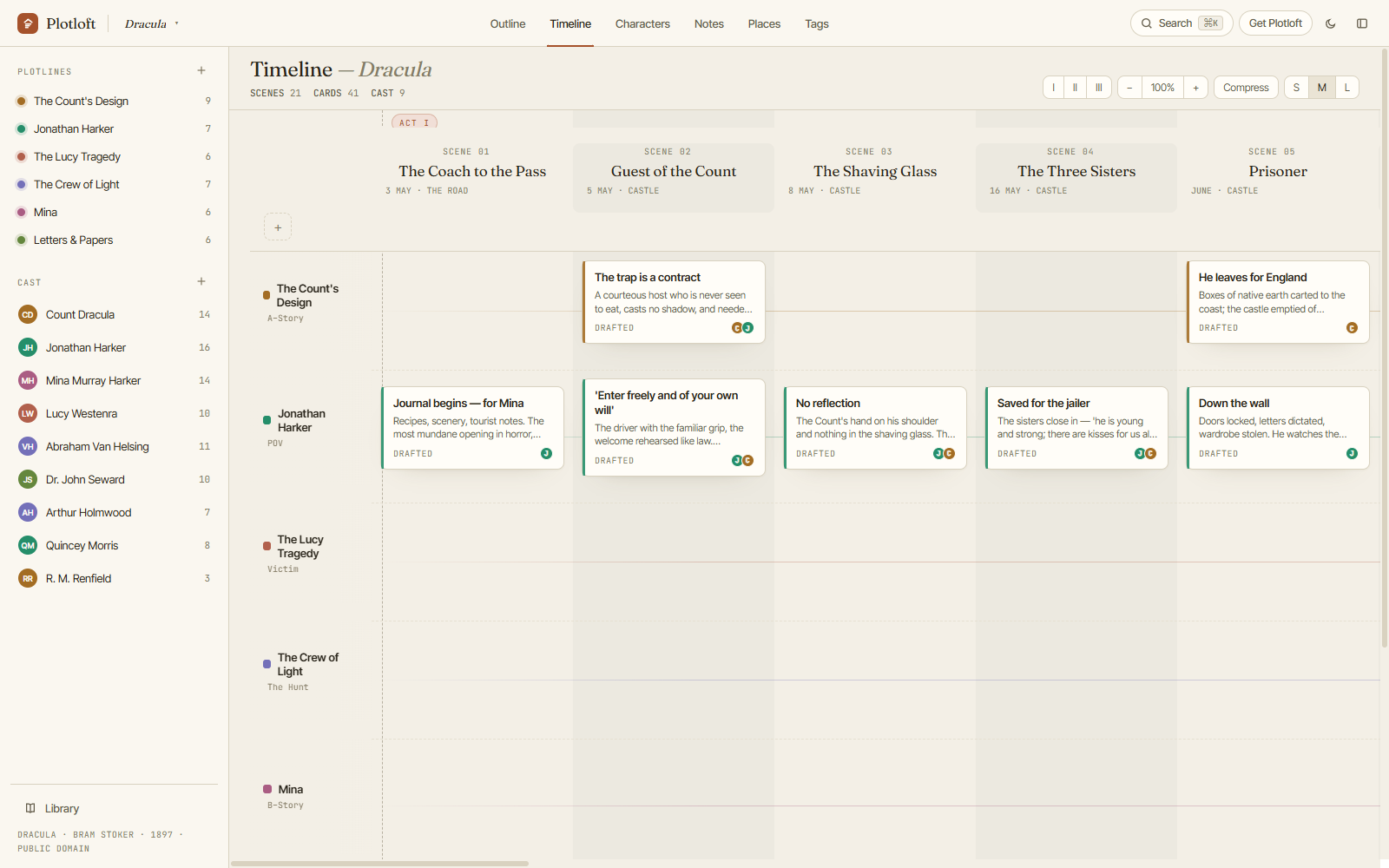
Plotloft is a plotting board for Windows: plotlines run across, scenes run
down, and beats sit where they cross, so a subplot that quietly disappears in
chapter nine is visible as a gap in a row rather than a feeling you can't
place. Projects are .plotloft files in your Documents folder —
readable, copyable, backed up by whatever you already use. There's no account,
no server and no telemetry, because there's nothing to sign into.
It will be a one-time purchase when it goes on sale, which it hasn't yet. Today it's a free download for Windows and a free browser demo. What it isn't: a drafting app (it plans; you write elsewhere), and it isn't on macOS or Linux yet.
Subscription apps that also sell a lifetime licence
These are the ones people miss when they assume the whole category has gone to rent. All four charge monthly by default, and all four will sell you the software outright if you ask — at a price that tells you how long they expect an average subscriber to stay.
Plottr — $150 lifetime, or $9.99 a month
The best-known visual plotting tool, and the closest thing to a direct competitor for what I build. Timeline view, plot templates, character sheets, series-bible features and a mature template library including the popular beat sheets. It exports to Scrivener, which is why so many writers own both.
Pricing as of July 2026: $9.99 a month or $60 a year for the base tier; $14.99 a month or $99 a year for Pro, which adds the browser app, cloud sync and collaboration. The lifetime licences are $150 (base), $599 (Pro) and $649 (Pro plus their community and course vault). The base tier stores files locally on your desktop. Worth knowing before you choose a plan: if a non-Pro subscription lapses you stop receiving updates, and if a Pro subscription lapses, project access is restricted — so the cloud tier is the one where letting the card expire actually costs you something.
At $150 for the base lifetime tier, Plottr is the most serious pay-once option in visual plotting, and it's more mature and more cross-platform than Plotloft is today. That's the honest comparison.
Dabble — $699 lifetime, or $19 a month
A polished, friendly plan-plot-and-write app with a plot grid, goal tracking and good revision tools. Tiers run $19, $29 and $49 a month (Writer, Author, Bestseller), with 20% off for annual billing, and a 14-day trial with no card required. Lifetime Author access is $699 — which, as Dabble itself puts it, is roughly two years paid up front in exchange for keeping it forever.
Novlr — $499 lifetime, or $8 a month
Browser-based, with a genuinely usable free tier (two projects). Starter is $8 a month and Studio $16 a month, both billed yearly, and a $499 one-time payment makes you a Lifetime Studio member — which in Novlr's case also comes with a co-ownership scheme, an unusual and rather likeable idea.
Campfire — around €303 lifetime, or about €11 a month
The worldbuilder's option: modules for magic systems, languages, species, religions, maps, relationship webs and more, which you can buy individually or as a bundle. The free tier is limited but real (25,000 manuscript words, ten characters, twenty timeline events). Its store quoted us €10.83 a month and €303.12 for Standard Lifetime, both marked as discounted from higher list prices; Campfire bills in dollars and many other currencies, so you may see different figures. Lifetime and annual purchases carry a 30-day refund.
The comparison, in one table
| Tool | One-time price | Also rents? | Platforms | Where your work lives |
|---|---|---|---|---|
| Scrivener | $59.99 per platform (iOS $23.99) | No | macOS, Windows, iOS | Project files on your disk |
| bibisco | Free, or $69 (2 years of updates) | Only for optional mobile sync | Windows, macOS, Linux | Project files on your disk |
| Story Planner | $8.99 iPhone/iPad · $12.99 Mac | No | Apple only | Your devices, iCloud sync |
| Atticus | $147 (formatting, not plotting) | No | Browser (offline capable) | In Atticus; exports to EPUB/PDF/DOCX |
| Plottr | $150 base · $599 Pro | Yes, from $9.99/mo | macOS, Windows, Linux, browser (Pro) | Local files; cloud on Pro |
| Novlr | $499 | Yes, from $8/mo | Browser | Your Novlr account |
| Campfire | ≈€303 | Yes, from ≈€11/mo | Browser, desktop, mobile | Your Campfire account |
| Dabble | $699 | Yes, from $19/mo | Browser, desktop | Your Dabble account |
| Plotloft (ours) | One payment, when sales open | No | Windows | .plotloft files in Documents |
Each vendor's own list price, checked 20 July 2026. Several price by region and add VAT at checkout, so what you're quoted may differ from what we were — where a store showed us euros, that's the figure we've printed.
No account, nothing to cancel. The Plotloft demo is the whole app in your browser, loaded with Dracula — edit anything, then close the tab and it's gone.
Open the demo →What actually happens if you stop paying?
This is the question that should drive the decision, and it splits the list cleanly in two.
If the files are on your disk — Scrivener, bibisco, Plottr's base tier, Plotloft — stopping paying is a non-event, because there's nothing to stop. You keep the version you bought. bibisco stops sending you updates after two years unless you buy the discounted upgrade; the app itself carries on. Ten years from now, on a machine with no internet connection, the program still opens the file.
If the files are in an account — Dabble, Novlr, Campfire, Atticus, Plottr Pro — lapsing means something specific, and it varies by app. Sometimes you drop to the free tier's limits, and anything above them becomes read-only: Campfire's free plan, for instance, caps you at ten characters and twenty timeline events, and elements beyond the limit become read-only rather than vanishing. Sometimes, as with Plottr Pro, project access is restricted outright. Nobody deletes your novel out of spite — but "your work is safe" and "you can still open your work" are different sentences.
This is also why a lifetime licence on a hosted app is a weaker promise than a lifetime licence on a desktop app, even at the same price. One buys you a program; the other buys you access to a service that has to keep existing. Both are fine bets on a healthy company. Only one of them survives the company closing — and writing tools do close: NovelEasy is shutting down on 1 October 2026 and erasing everything on its servers, with users told to download each novel by hand before the lights go out.
So before you buy anything on this list, run the five-minute test. Open the tool. Find the export command. Export a project. Then look at what you got: is it your manuscript in a format any word processor opens, or a settings dump that only means anything to the app that produced it? Both are useful, but only the first one is your book. If you can't find an export command at all, that's your answer.
So which one?
If you want one program for planning and drafting and you'd like to stop thinking about it: Scrivener. If you want to spend nothing today: bibisco's Community Edition. If you plot visually and want the most mature tool with a genuine buyout: Plottr's $150 lifetime tier. If you plan on an iPad: Story Planner. If you're formatting a finished book: Atticus. If you build worlds more than you plot them: Campfire.
And if what you actually want is to see all your plotlines at once, on one board, in files that sit on your own disk — that's the thing I'm building, and you can try it in a browser or download it free for Windows without giving anyone an email address.
Fair questions, straight answers
Is Scrivener a subscription?
Does Plottr have a lifetime option?
What's the cheapest way to plan a novel without paying monthly?
Is a "lifetime" licence really for life?
What happens to my writing if I stop paying?
- Plottr alternatives, grouped by the kind of planner you are — if it's specifically the visual plotline grid you're shopping for.
- Where is my novel? — the exact folder Plotloft keeps your work in, and what its backups actually do.
- The Dracula demo — a whole novel on one board, editable, no account.