Plottr alternatives, grouped by the kind of planner you are
The short version: the right alternative depends entirely on which part of Plottr you were reaching for. Scrivener ($59.99) if you want to plan and draft in one program. Aeon Timeline ($65) if your problem is chronology rather than structure. Campfire (free tier, ~€303 lifetime) if you're building a world. Milanote (free tier, $9.99/mo) if you want a corkboard rather than a grid. bibisco (free) if you want to spend nothing. Notion (free for solo users) if you enjoy building your own system. And Plotloft — mine, so weigh it accordingly — if you want the plotline grid in files that live on your own disk.
One more, which most "alternatives" lists skip: if your only objection to Plottr is the monthly bill, Plottr sells a $150 lifetime licence. That's a cheaper fix than migrating.
Search for Plottr alternatives and you'll mostly find software-directory pages suggesting Evernote, Final Draft and OneNote. Those are a note app, a screenwriting app and another note app. None of them do the thing you opened Plottr for, which is seeing a whole novel's plotlines at once.
So this list is organised by what you were trying to do, not by feature checkboxes. Prices are from each vendor's own store, checked 20 July 2026. I build one of the tools below and I've said so plainly in its section.
First: what Plottr gets right
Plottr is the best-known visual plotting tool for a reason, and any honest alternatives list should start by admitting that. Its timeline grid — plot lines as rows, chapters or scenes as columns, colour-coded cards where they meet — is genuinely good at showing a novel's shape. In her review for Jane Friedman's site, novelist Jessica Strawser calls the chapter-by-chapter grid "a beautiful thing", and praises the filtering (view only one point-of-view character's chapters while the rest fade back) and the drag-and-drop reorganising.
Beyond the grid, Plottr has things a newer tool simply doesn't: a library of 30-plus starter templates built on established story structures, series planning across multiple books, story-bible features for characters and places, import from Scrivener and Snowflake Pro, and export to Word and Scrivener. Its Pro tier adds a web app, cloud sync, collaboration and offline mode, so you can plot on a Chromebook or a tablet.
If you're looking around because of price or a specific missing feature, the sensible first question is whether a different Plottr plan fixes it. As of July 2026: $9.99 a month or $60 a year for the base tier; $14.99 a month or $99 a year for Pro; and lifetime licences at $150 (base), $599 (Pro) and $649 (Pro with their community and course vault). The base tier keeps files on your desktop.
Why writers look elsewhere anyway
Three reasons come up repeatedly, and I'd rather name them accurately than invent grievances.
The billing model. A plotting tool gets used in bursts — hard for six weeks while you break the story, then barely at all for months. Monthly billing suits software you open daily. The $150 lifetime tier answers this, but it's three times what a lot of writers expect to pay for planning software, and it isn't the option the pricing page pushes hardest.
Specific structural limits. Strawser's review — first published in 2020 and updated in April 2025 — flags concrete things: chapters auto-renumber when you move them, which can make it hard to track where the original structure went; there's no way to keep a chronological story timeline separate from the chapter outline, which bites writers with dual timelines or heavy flashbacks; and colour formatting doesn't survive export. She also found the learning curve steep with sparse tutorials. Plottr ships updates constantly and the Pro web app is much newer than that review's first draft, so treat these as questions to test in the trial rather than settled facts.
Where the files live. The base tier stores projects locally, which is good. But note the asymmetry in what lapsing costs you: let a base subscription expire and you stop getting updates, while letting a Pro subscription expire restricts access to your projects. If long-term access matters more to you than sync does, that's worth knowing before you pick the cloud tier.
The alternatives, by what you actually want
You want to plan and draft in one program → Scrivener, $59.99
The most common destination for people leaving Plottr, and often the right one. Scrivener gives you a binder of chapters and scenes, a corkboard of index cards you can shuffle, an outliner, a research folder that holds your PDFs and images, and a compiler that turns the lot into a submission-ready manuscript. The planning tools are views onto your actual document rather than a separate plotting surface — which is exactly the appeal if you're tired of maintaining a plan and a draft as two different things.
What you lose: the plotline grid. Scrivener's corkboard is one dimension — a sequence of cards — not plotlines crossing scenes. Tracking six threads through forty scenes is not what it's for. Licences are per platform ($59.99; we're quoted €69.99 from Europe), iOS is a separate $23.99, and there's a 30-day trial.
Your problem is chronology, not structure → Aeon Timeline, $65
The distinction that trips people up: Plottr organises your story in telling order, the sequence the reader meets it in. Aeon Timeline organises it in story order, on real dates, with durations and dependencies. It will tell you that your character can't be in Whitby on the 8th if she was in London on the 7th. If your novel has dual timelines, flashbacks, or a mystery whose solution depends on who was where, this is the tool that catches the errors readers write in about.
It's a perpetual licence: $65 buys the current version plus a year of updates across up to five devices on Mac, Windows and iOS, after which updates are an optional $35 a year that you can stop paying while keeping the version you have. Timeline files live on your own computer. There's a 14-day trial.
You're building a world, not just a plot → Campfire, free tier or ~€303
Campfire is modular in a way nothing else here is: separate modules for magic systems, languages, species, religions, cultures, philosophies, maps, relationship webs, encyclopedia articles and more, which you can buy individually or as a bundle. If your planning problem is that your invented world has outgrown your head — and the plot is the easy part — this is the one.
The free tier is limited but genuinely usable (25,000 manuscript words, ten characters, twenty timeline events, two relationship webs). Its store quoted us €10.83 a month and €303.12 for Standard Lifetime, both marked down from higher list prices; Campfire bills in dollars and many other currencies, so your figures may differ. Work lives in your Campfire account rather than on your disk.
You want a corkboard, not a grid → Milanote, free tier or $9.99/mo
Some writers don't want rows and columns at all — they want a wall they can pin things to, with cards wherever they feel right, arrows between them, and images and clippings mixed in with the scene notes. Milanote is that, done well, in a browser. It's a general visual-thinking tool rather than a novel tool, so it knows nothing about scenes or plotlines; you get freedom and no structure, which is either the point or the problem.
Free for 100 notes, images or links plus 10 file uploads — enough to plan a novel if you're economical — then $9.99 a month billed annually, or $12.50 billed monthly, for unlimited everything.
You want to build your own system → Notion, free for solo users
A database of scenes with properties for point of view, plotline, date and status, viewed as a board or a table, is a perfectly good plotting tool, and it's free: Notion places no page or block limit on a solo workspace. Paid plans start at €9.50 per member per month and are aimed at teams, which most novelists aren't.
The catch is that you're now maintaining a system as well as a novel. Everyone who does this well enjoys doing it. If tinkering with the tool is a procrastination hazard for you, buy something opinionated instead.
You want to spend nothing at all → bibisco Community, or index cards
bibisco's Community Edition is free on Windows, macOS and Linux and is not a crippled demo: chapters and scenes, structured character interviews, timelines, mind maps and exports. The paid Supporters Edition is $69 one-time with two years of updates. It's a desktop app, so your project files are yours.
And the oldest alternative still works. Index cards on a wall, one row per plotline, one column per chapter, is exactly the layout every visual plotting app is imitating — including mine. It costs a few pounds, survives power cuts, and the only export format is a photograph. Plenty of published novels were planned this way and still are.
You want the grid, in files you own → Plotloft (mine)
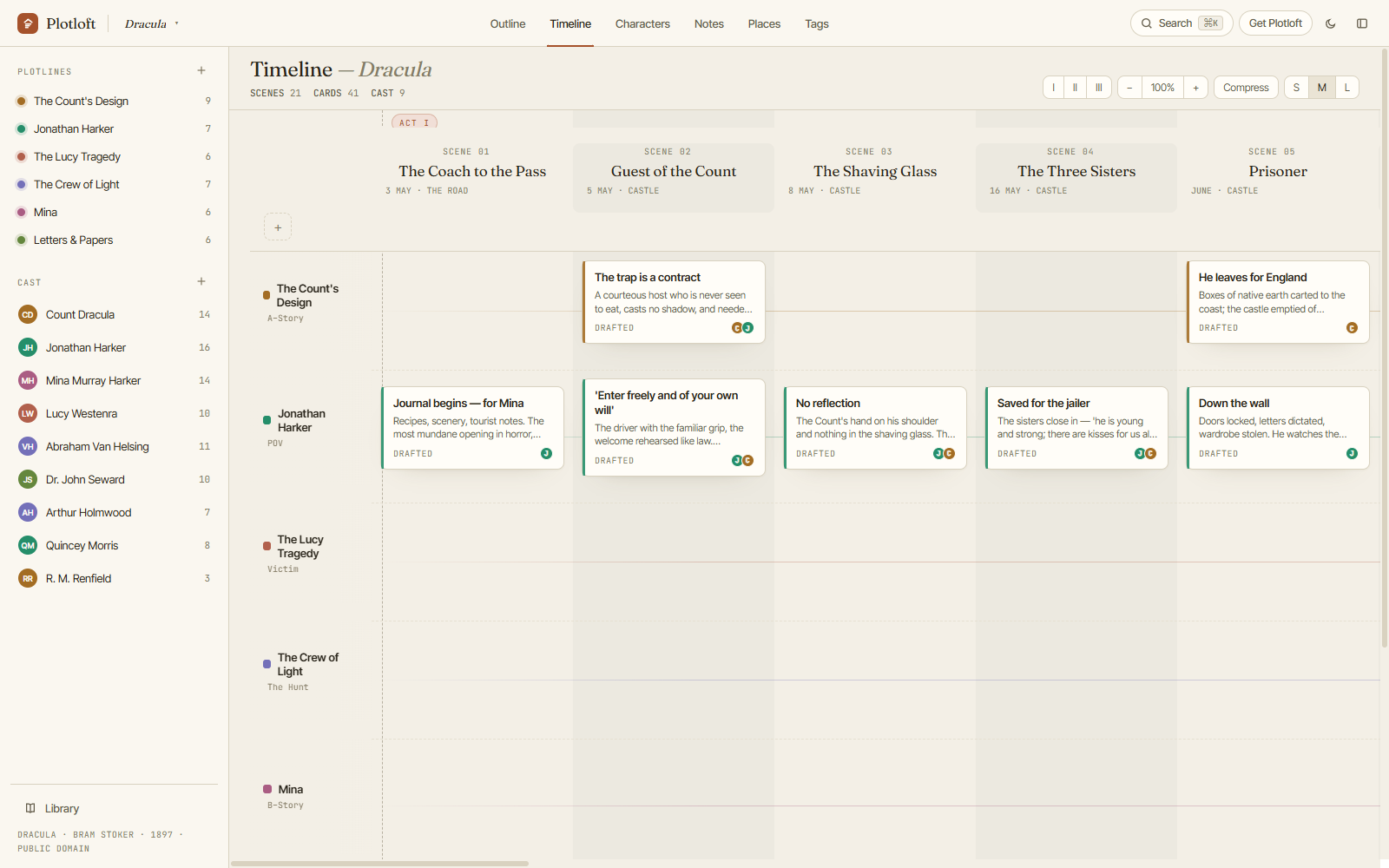
This is my own tool, so read this section as the pitch it is. Plotloft is a plotting board for Windows built on the same idea as Plottr's grid — plotlines across, scenes down, beats where they cross — with the timeline, characters, places, notes and tags all reading from one living outline, so moving a beat moves it everywhere.
The differences that matter: projects are .plotloft files in
your Documents folder, readable and copyable, with rolling local backups
beside them. There's no account and no server, so there's nothing to sign into
and nothing to lose access to. It'll be a one-time purchase when it goes on
sale.
What Plottr does better today, plainly: it's older and steadier, it runs on macOS and Linux and in a browser where Plotloft is Windows-only, it has the template library and series planning, and it exports to Scrivener. Plotloft is pre-release. If you need any of that list, buy Plottr's lifetime tier and be happy.
The comparison, in one table
| Tool | Price | Best at | Platforms | Where your work lives |
|---|---|---|---|---|
| Plottr | $9.99/mo · $60/yr · $150 lifetime | The visual plotline grid, templates, series | Win, macOS, Linux, browser (Pro) | Local files; cloud on Pro |
| Scrivener | $59.99 per platform, one-time | Planning and drafting in one place | macOS, Windows, iOS | Project files on your disk |
| Aeon Timeline | $65 one-time, then optional $35/yr | Chronology, dual timelines, continuity | Mac, Windows, iOS (5 devices) | Files on your computer |
| Campfire | Free tier · ≈€11/mo · ≈€303 lifetime | Worldbuilding, modular depth | Browser, desktop, mobile | Your Campfire account |
| Milanote | Free (100 items) · $9.99/mo annual | Freeform corkboard and mood boards | Browser | Your Milanote account |
| Notion | Free for solo users | Building exactly the system you want | Browser, desktop, mobile | Your Notion workspace |
| bibisco | Free, or $69 one-time | Character depth, spending nothing | Windows, macOS, Linux | Project files on your disk |
| Index cards | A few pounds | Not having a screen involved | A wall | Your wall |
| Plotloft (mine) | One payment, when sales open | The grid, in files you keep | Windows | .plotloft files in Documents |
Each vendor's own list price, checked 20 July 2026. Some price by region and add VAT at checkout — where a store quoted us in euros, that's the figure printed here.
Try the grid before you commit to anything. The Plotloft demo is the whole app in your browser with Dracula already plotted — no account, no download, nothing saved.
Open the demo →How to try all of these for nothing
Before you pay for any of them, you can spend an evening with the lot. Every tool here has a free way in, and using two or three for an hour tells you more than a fortnight of comparison tables.
- Plottr — free trial from their site, so you can test the specific limitations above against the current version.
- Scrivener — 30-day trial.
- Aeon Timeline — 14-day trial.
- Campfire, Milanote, Notion — permanent free tiers; no trial clock to race.
- bibisco — the Community Edition is free forever, and includes a 30-day trial of the Supporters features.
- Plotloft — the browser demo needs no account, and the Windows app is a free download while we're pre-release.
One practical note while you're testing: make a small real thing in each, not a toy. Take four scenes from something you're actually writing and put them in. Tools feel wonderful in the abstract and reveal themselves the moment you try to represent a story that resists tidiness.
Fair questions, straight answers
What's the best Plottr alternative?
Is there a free alternative to Plottr?
Can I use Plottr and Scrivener together?
Does Plottr have a lifetime licence?
What's the difference between Plottr and Aeon Timeline?
- Novel planning software you buy once — the wider list of pay-once tools, and what happens to your work when a plan lapses.
- Where is my novel? — where Plotloft keeps your work on disk, and what its backups do.
- The Dracula demo — a whole novel on one board, editable, no account.