Plotloft vs Plottr: an honest comparison
The short version: both are built on the same idea: plotlines across, scenes down, story beats where they cross. Pick Plottr if you're on a Mac, plan series, want a big template library or need to plot from a tablet. Pick Plotloft if you're on Windows and want to pay once ($49) and keep your projects as files on your own disk with no account. It opens your Plottr files, so trying it costs you nothing.
I build Plotloft, so this is a comparison written by one side. I've tried to make it the one I'd want to read anyway: Plottr's prices come from its own pricing page, checked on 3 October 2026, and the section on what Plottr does better is a real list.
What the two apps have in common
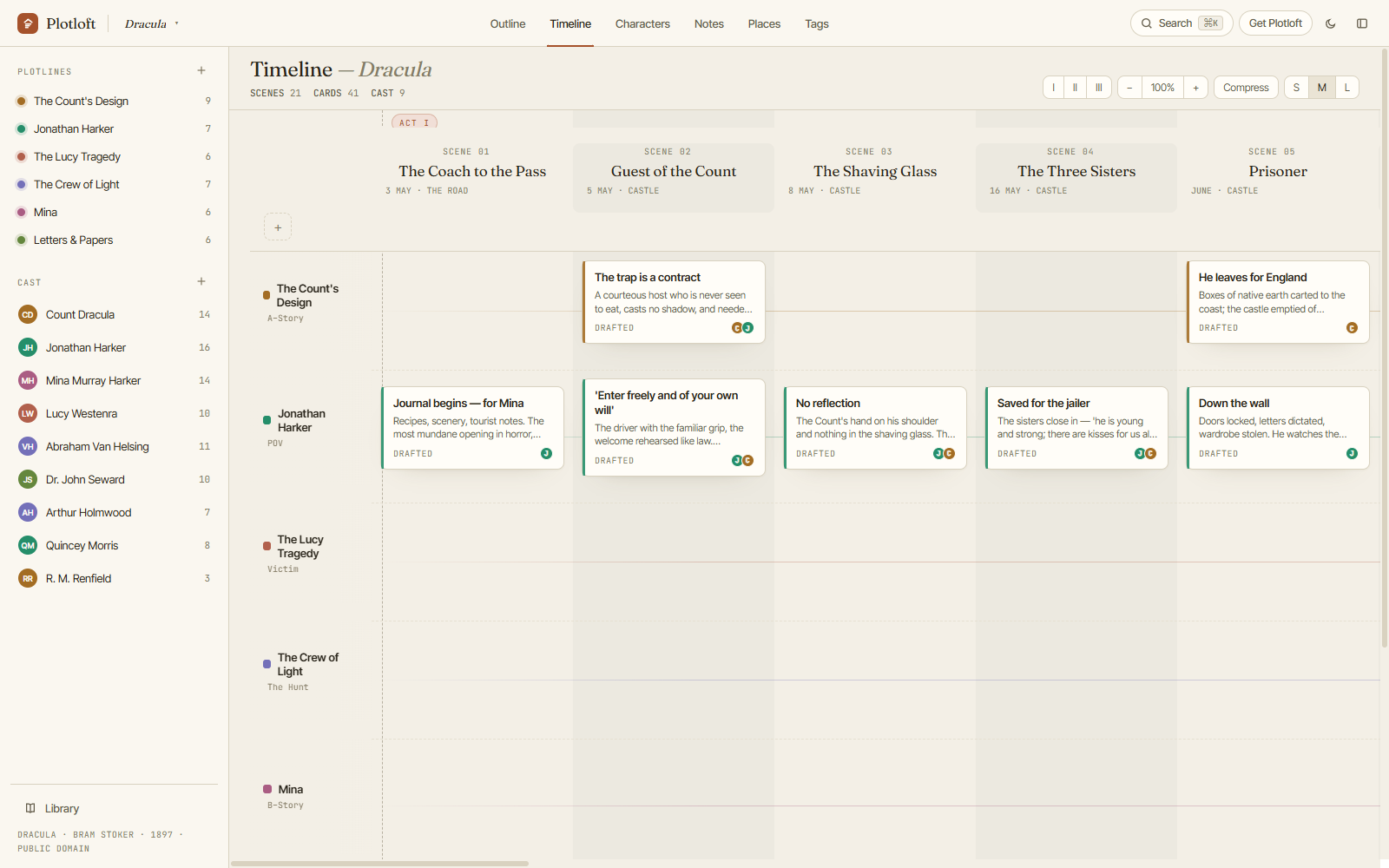
Plottr popularised the plotting grid on screen: each plotline is a row, each chapter or scene is a column, and a coloured card sits wherever a plotline has something happen in that scene. Plotloft uses the same layout. It's an old idea. Novelists did it with index cards on a wall long before either app existed, because it's the one view that shows you a whole book at once: where the romance goes quiet for ten chapters, which subplot never pays off, how late the villain turns up.
Both are planning tools, not places to write prose. Both keep characters, places and notes next to the grid. Both let you drag things around until the shape is right. Both export the plan for drafting elsewhere, Scrivener included. If you've used one, you'll find your way around the other in minutes.
Side by side
| Plottr | Plotloft (mine) | |
|---|---|---|
| Price | $9.99/mo or $60/yr; $150 lifetime. Pro: $14.99/mo, $99/yr, $599 lifetime | $49 once (early access), $59 from 1.0 |
| Platforms | Windows and Mac; Pro adds a browser app | Windows 10 and 11 |
| Where projects live | On your device (base plan) or Plottr's cloud (Pro) | .plotloft files in a folder you choose |
| If you stop paying | Base: app keeps working, no updates. Pro: no project access until you renew | Nothing to stop paying |
| Story templates | 30+ | 4 (Three Acts, Hero's Journey, Mystery, Save the Cat) plus blank |
| Series planning | Yes, across books | One manuscript per book, shelved as a series |
| Imports | Scrivener, Snowflake Pro | Plottr .pltr files |
| Exports | Word, Scrivener | Word (.rtf), Markdown, OPML (Scrivener binder), print/PDF |
| Collaboration and sync | Pro | No (put the file in a folder you already sync) |
| Try first | 30-day free trial | Browser demo; Windows sandbox; 14-day refund |
Plottr prices and plan terms from plottr.com/pricing, 3 October 2026. Plottr also sells a Pro + Community tier ($129/yr, $649 lifetime).
What does each cost over time?
For a tool you use in bursts, this is the question that matters. You plot hard for six weeks, then barely open the app while you draft, then come back to it when the second act falls apart.
Plottr's base plan at $60 a year costs $60 for the first book, $120 by the end of year two and $180 by year three. Its $150 lifetime licence stops the meter, and if subscriptions are your only problem with Plottr, that licence is a perfectly good answer. You don't need to switch apps to get it.
Plotloft is $49 once while it's in early access and $59 from version 1.0 in November, with updates through 1.x included. That's less than a single year of Plottr's base plan, and about a third of its lifetime licence. There is no Plotloft subscription and no paid tier above it.
The honest counterpoint: if you're plotting one book this autumn and may never plot another, one month of Plottr at $9.99 is the cheapest way to use a real plotting grid. Cancel when you're done; the base plan keeps working without updates.
Where does your plan actually live?
On Plottr's base plan, projects are stored on your device, and you can keep them in Dropbox or iCloud yourself. On Pro they live in Plottr's cloud, with automatic sync and backups. That's the part Pro is for. Plottr's own pricing page is clear about the trade: when a Pro plan expires, you lose updates and you can't open your projects until you renew. Before choosing the cloud plan, decide whether sync is worth more to you than guaranteed access.
Plotloft only does the local half. Each project is one
.plotloft file, in your Documents folder or any folder you
pick, including one OneDrive or Dropbox already syncs. The file is
readable JSON, so even without Plotloft your outline is still there in a
text editor. The app keeps rolling backups of every session and lets you
save named versions before trying the brave rewrite of Act 2. There's no
account to sign into, so nothing can lock you out of your own plan. The
cost of that design is just as real: no built-in sync, no web app, no
collaborators. Every path is spelled out
here.
What Plottr does better
Plainly, and without hedging:
- It runs on a Mac, and on Pro in a browser, a Chromebook or a tablet. Plotloft is Windows-only today. If you plot on a Mac, the comparison ends here.
- Templates. Plottr ships 30-plus starting structures. Plotloft has four and a blank board.
- Series planning goes deeper in Plottr. Plotloft keeps one manuscript per book and shelves them together, which works, but Plottr's series view is the more developed feature.
- Mileage. Plottr has been around for years and has a large user community, courses and plenty of tutorials. Plotloft is in early access: complete, in daily use on a real novel, but newer.
- Sync and collaboration, if you want them, are in Plottr Pro. Plotloft doesn't have either.
What Plotloft does differently
One beat per plotline per scene. A Plottr chapter can hold a stack of cards on the same plotline. In Plotloft, each scene holds at most one beat per plotline, so every cell on the board is a single thing you can read at a glance. If a plotline does three things in one chapter, that's three scenes. It's a deliberate constraint, and it's the biggest practical difference you'll notice.
Everything reads one outline. The timeline, the outline view, each character's page, the tag index and the places all read the same data. Move a beat and every view that shows it updates, including the list of scenes on each character's page.
Built for re-plotting. You can drag beats between scenes and plotlines, drag whole scenes or a multi-selected block of them, and the acts renumber themselves. Every change can be undone.
Pay once, own the files, no account. That's the whole business model, not a tier.
Switching from Plottr
Choose Import from Plottr in Plotloft's library and pick your
.pltr file. Plotlines (in order, colours matched), chapters,
acts, cards, characters, places, tags and notes all come across, and a
series arrives as one manuscript per book. Card custom attributes become
beat fields, and character attributes land in a "From Plottr" tab.
Plotloft only reads the Plottr file. It never writes to it, so you can keep both apps side by side while you decide. Stacked cards are the one thing that changes shape: each card becomes its own scene, named after the card. The import guide covers the details, including what happens to formatting and images.
One limit to know before you buy: the free Windows sandbox opens straight to the demo board, so you can't try the import until you have a licence. The 14-day refund is there in case it doesn't work for your project. If part of a project goes missing in the import, email hello@plotloft.com and I'll fix the importer.
See if the board fits how you think. The demo is the whole app in your browser with Dracula already plotted: no account, no download, nothing saved.
Open the demo →Which should you pick?
- You're on a Mac or plot from a tablet: Plottr.
- You plan long series in depth or want lots of templates: Plottr.
- You like Plottr but hate the subscription: look at Plottr's $150 lifetime licence before you switch anything.
- You're on Windows and want pay-once, local files and no account: Plotloft. Run the demo first, then the 14-day refund covers the rest.
- You need sync or a co-writer: Plottr Pro. Plotloft doesn't do either.
And if you can't tell yet, take four scenes from the book you're actually writing and put them into both. An hour of that will tell you more than this page.
Fair questions, straight answers
Is Plotloft cheaper than Plottr?
Can Plotloft open Plottr files?
.pltr file. Plotlines, chapters, cards, characters, places, tags and notes come across, a series arrives as one manuscript per book, and the Plottr file is only read, never changed. The one structural difference: a Plottr chapter can hold a stack of cards on one plotline, and Plotloft gives each of those cards its own scene. More in the import guide.Does Plotloft run on Mac?
What happens to my Plottr projects if I stop paying?
Can I try both before buying?
- Plottr alternatives, grouped by the kind of planner you are: seven other options, including free ones.
- Plotloft vs Scrivener: why many writers end up using a planner and a drafting app together.
- Coming from Plottr: what the
.pltrimport brings across. - Novel planning software you buy once: the wider list of pay-once tools.