Plotloft vs Scrivener: plan on a board, draft in Scrivener
The short version: they do different jobs. Scrivener ($59.99 per platform, once) is where you write the book: binder, editor, research folder, compile. Plotloft ($49, once; Windows) is where you plan it, on a board with plotlines across and scenes down. If you only want one app, get Scrivener; its corkboard and outliner are enough planning for many writers. If you keep losing track of your subplots inside Scrivener, plan in Plotloft and send the outline to Scrivener's binder as OPML.
I build Plotloft, so read this as one side's view. I use it to plan the novel I'm writing, and the honest answer for most Scrivener users is "both, or just Scrivener", not "switch".
Two different jobs
Scrivener is a drafting app with good planning tools built in. Your manuscript lives in a binder of chapters and scenes. You can view the same scenes as index cards on a corkboard or as rows in an outliner, keep PDFs and images in a research folder next to the text, take snapshots before a risky rewrite, and compile the whole thing into a manuscript, an ebook or a print file at the end. It's been the default serious writing app for years for good reason.
Plotloft is only a planning tool. There's no manuscript editor in it at all. It holds the plan: which plotlines exist, what each one does in each scene, who is where, which threads you've forgotten. When it's time to write, the plan goes wherever you draft.
So the real question isn't "which is better" but "is Scrivener's planning enough for this book?" For a lot of books, it is.
Where Scrivener's corkboard stops
Scrivener's corkboard is a sequence: cards in narrative order. Scrivener 3 adds a useful trick on top, Arrange by Label. Make a label for each plotline, give each scene one, and the corkboard lays the cards out on a separate track per label, still in story order. Dragging a card to another track changes its label. Lots of writers plot this way, and if it works for you, you don't need anything else.
The limit is that a document has one label, so a scene sits on exactly one track. Real scenes rarely belong to one thread. The scene where Mina writes in her journal moves the vampire plot, the romance and the mystery of what's happening to Lucy. On a label track it can only show up once.
A plotting board turns this around. Each plotline is a row, each scene is a column, and a scene can hold a beat on every row it touches. Read across a row and you get one thread from start to finish, with gaps showing as empty cells: the subplot that disappears for eight chapters, the character who has nothing to do in Act 2. Read down a column and you see everything a scene is carrying. Scrivener can't show you that, and it isn't trying to.
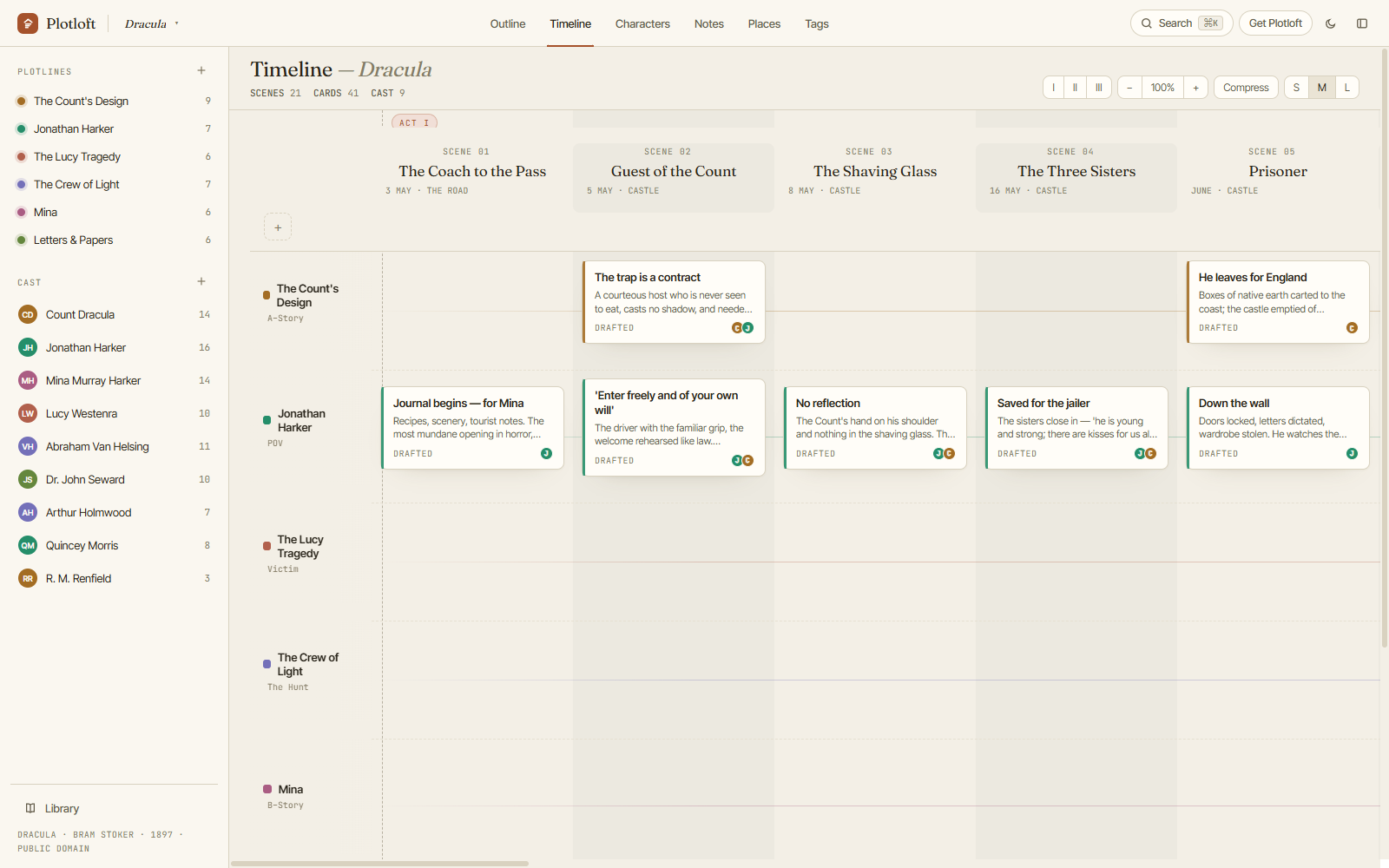
Side by side
| Scrivener | Plotloft (mine) | |
|---|---|---|
| What it's for | Writing the manuscript, with planning views | Planning the novel; no manuscript editor |
| Price | $59.99 per desktop platform, once; iOS $23.99 | $49 once (early access), $59 from 1.0 |
| Platforms | macOS, Windows, iPhone/iPad (licensed separately) | Windows 10 and 11 |
| Planning views | Corkboard (with label tracks), outliner, binder | Plotline × scene board, outline, character, place and tag pages |
| One scene on several plotlines | No, one label per document | Yes, one beat per plotline per scene |
| Characters and places | Character and setting sketch templates in the binder | Pages with your own fields, relationships, and the scenes each appears in, read from the board |
| Research and compile | Yes, both mature | No |
| Where your work lives | Project files on your disk | A .plotloft file on your disk |
| Try first | Free trial: 30 days of actual use | Browser demo; Windows sandbox; 14-day refund |
Scrivener prices from Literature & Latte's US store, 3 October 2026. Prices vary by region; a macOS + Windows bundle and education licences are also sold.
One thing they agree on: both keep your work in files on your own computer, with no account standing between you and your book. That's rarer than it should be.
What Scrivener does better
- It's where the book gets written. Plotloft has no editor, no word counts and no compile. That's deliberate, but it means Plotloft can never be your only writing app.
- Platforms. Mac, Windows, iPhone and iPad. Plotloft is Windows-only today.
- Research. PDFs, images and web pages sit in the binder next to the scenes that need them.
- Mileage. Scrivener has been refined for years and has a deep manual, a busy forum and endless tutorials. Plotloft is in early access.
- One tool, one file. Planning and drafting in the same project means the plan and the draft can't drift apart. With two apps, they can.
What a dedicated board adds
- Every thread visible at once, with the gaps showing. This is the main reason to have a separate plotting tool.
- Re-plotting is cheap. Drag beats between scenes and plotlines, drag whole scenes or a block of them, and the acts renumber themselves. Every change can be undone, and rolling backups plus named versions cover the rest.
- Characters that know where they've been. Each character page lists the scenes they appear in, worked out from the board, so it's always current.
- It stays small. A plan with no prose in it is easy to see whole. Many writers find it easier to rethink Act 2 when the 50,000 words of Act 2 aren't sitting underneath.
Using both together
A workflow that works:
- Break the story in Plotloft. Plotlines, scenes, beats, the cast. Rearrange until every row reads well from start to finish.
- Export the outline as OPML. In Plotloft, File ▸ Export outline ▸ OPML. In Scrivener, File ▸ Import. Your acts, scenes and beats arrive as a binder tree, each beat's summary as its document text.
- Draft in Scrivener. The binder is already built.
- Come back to the board when the plan breaks. It will. Re-plot there, then re-export or adjust the binder by hand.
One honest caveat: the export is a one-way snapshot. Changes you make in Scrivener don't flow back to the board. Some writers treat the board as the plan of record and re-export at each big revision; others stop using the board once drafting is under way. The export guide shows exactly what ends up in the file, including the Word and Markdown formats if you draft somewhere else.
See whether a board adds anything for your book. The demo is the whole app in your browser with Dracula already plotted: no account, no download, nothing saved.
Open the demo →Which should you get?
- Only one app, ever: Scrivener. You need somewhere to write, and its planning tools are good.
- You plan in Scrivener and it's working: keep going. Don't add a tool you don't need.
- You have several plotlines and keep losing them: add a board. Plotloft if you're on Windows; Plottr if you're on a Mac (here's how those two compare).
- You draft in Word or Google Docs, not Scrivener: the same split works. Plotloft exports the outline as a Word document too.
Fair questions, straight answers
Can Plotloft replace Scrivener?
Can I get my Plotloft outline into Scrivener?
Doesn't Scrivener's corkboard already do this?
Is Scrivener a one-time purchase?
Does Plotloft work on Mac like Scrivener does?
- Plotloft vs Plottr: the two plotting boards, compared honestly.
- Exporting your outline: the Word, Markdown and OPML formats, and what's in each.
- Novel planning software you buy once: Scrivener, Plotloft and the other pay-once tools.
- Plottr alternatives: more planning tools, grouped by the kind of planner you are.